Blasts from the past

Two blasts from the past. Sorry for the long post but hey, this is a frigging blog, not some social media service for attention spans of mere seconds.

First “blast”

When teaching (exercise support sessions) over Zoom, we course teachers have a private chat in Slack to coordinate who goes to which breakout room to help students asking for help. When there’s no acute problems to address, we occasionally chat about random topics.

Yesterday I was participating from the bed using my laptop since I’ve got the flu but was well enough to participate somewhat.

I have had this idea to write the Data structures and Algorithms course materials into a book format. Not to be sold in book stores, but just shared to the students as a single PDF / eBook file.

I remembered doing exactly that, very very long time ago in a discontinued course, and happened to mention this to the other teachers in Slack; that I couldn’t find the book in my computer archives.

“Hold my beer”, said one of the teachers, and voilá, he uploaded that course pdf “book” from 1999 to the Slack channel! As it happens, he was at that time or just before, a student on that course and had archived the material! He is a lot better than me in archiving, apparently, so thanks JLa for that! He also participated in teaching (also) this course, as far as I can remember.

A snippet from the course material for Programming environments course.

The course, Programming environments, was originally a Mac programming course, by our Department Mac guru who left us a long time ago to work in the industry (good for him). Then later, I implemented the course for programming with C in Windows (thanks to Petzold’s book). Even later I also implemented a version to teach Symbian C++ programming in Nokia devices.

Anyhows, I liked the idea to provide the material in a “book” format to the students, and even distributed the book in an eBook format for them to read. A total of 45 pages. I wish I’d find the original editable document somewhere from my external backup drives or USB drives, would be fun to have it.

Maybe I’ll do this sometime again for some course. Writing can be fun.

The second “blast”

A thing I did find when browsing through my archives, was a department plan to arrange teaching for the study year 2009-2010.

Especially interesting for me was to check out the list of courses our team (software engineering focused teachers/courses) at the department taught that study year (table below).

I will just list the courses about programming or strongly programming related or strongly technical courses:

Finnish course nameEnglish course name
AlgoritmitAlgorithms
C ohjelmointiProgramming in C
C++C++ programming
Johdatus kääntäjiinIntroduction to compilers
Johdatus ohjelmointiinIntroduction to programming
Johdatus tietorakenteisiinIntroduction to data structures
LogiikkaLogic
Ohjelmistojen testausSoftware testing
Ohjelmointikielten periaatteetPrinciples of programming languages
Ohjelmointityö IProgramming assignment I
Ohjelmointityö IIProgramming assignment II
Ohjelmointityö IIIProgramming assignment III
Ohjelmointityö IVProgramming assignment IV
OHJY/MacOS/iPhoneProgramming environments / Mac/iPhone
OHJY /  WindowsProgramming environments / Windows
OHJY / UnixProgramming environments / Unix
OHJY/ SymbianProgramming environments / Symbian
Olio-ohjelmointiObject oriented programming
Projekti ITerm project for external customers, programming
Projekti IITerm project for external customers, often included programming
Rinnakkainen ohjelmointiParallel / concurrent programming
RTCSReal time computer systems
Tietokantojen perusteetIntroduction to databases
Unix perusteetIntroduction to Unix

In some of those courses, doing actual programming by the students might have been a relatively small part of the course. And some of the courses were not offered every year. Just not to inflate the amount of actual programming done in some of these courses.

But – if you compare these strongly programming focused courses of that time to the list of current programming or strongly technical courses in the study program:

Finnish course nameEnglish course name
Laitteet ja tietoverkotDevices and Data networks
Ohjelmointi 1Programming 1
Ohjelmointi 2Programming 2
Tietorakenteet ja algoritmitData Structures and algorithms
TietokannatDatabases
Ohjelmointi 3Programming 3
Ohjelmointi 4Programming 3
Ohjelmistojen laatu ja testausSoftware Quality and testing
Bachelor projectProgramming project for external customers
Master’s projectSystems development /analysis project for external customers

So at that time around 2010, we had a total of 24 very technical/programming courses in old study program. Currently we have only 10.

There are courses on software engineering and such nowadays too, but they usually do not include learning to construct things and spending a relatively significant amount of time doing that – that is what I mean by a technical course here, and what was done earlier.

The current study program at the MSc level does not have a single course focused on programming. No more than 5-6 years ago, we still had at least one, Embedded software development environments, focusing (mostly) on distributed mobile programming (taught by me and some other teachers). Before that, we (including me) taught, together with Tampere University of Technology, Mobile systems programming course (Symbian, J2ME). All discontinued.

Currently we have nothing about parallel / concurrent programming in the study program. Last week I did one very small demo to at least show an extremely little thing about concurrency in my course on Data structures and algorithms. To let the students at least to be aware that something like this actually exists and could be done. So like 15 minutes of that topic in the whole study program.

Principles of programming languages, logic, compilers — totally gone from the study program in just over ten years.

You know (and I know) that there are as many opinions than there are you-know-what, but in my personal honest opinion, this is not good. Considering the needs of the local software industry.

Of course the technical topics of today would be perhaps different and obviously should be up to date with modern technologies. But if these kinds of topics and the deeply technical perspective on things is missing, there is not even the chance to discuss if they would or should be updated.

Well, maybe this is just another case for this:
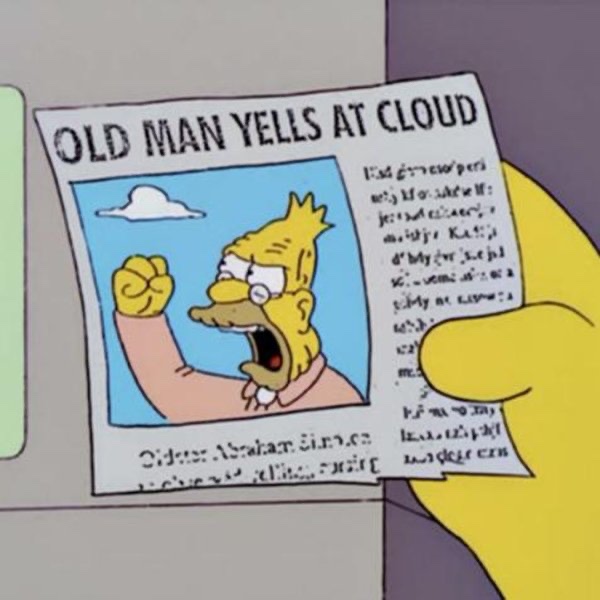
Image of an old man yelling at the clouds from the Simpsons
Old man yelling at cloud, again

Multiple Git repository status awareness app

A year ago I started to implement a GUI app that I could use to track the 250-300+ student projects of my Data structures and algorithms course. The motivation for the tool was to answer the question:

How can you manage four courses with nearly 1000 students when you only have two full time teachers and two part-time supportive teachers to manage all teaching, evaluating and supporting the students in their learning in all of these courses?

Me

The plan was, that using this tool, I could more easily be aware of the statuses of the many student projects in this one course. And then when necessary, do something about possible issues.

Like, knowing that a student is left behind (no commits to the project in the last week or two), gives me a possibility to ask if there is anything I as a teacher could do to help the student to proceed in the course.

And if one or several of the unit tests of the various course programming tasks fail, especially if the task was supposed to be finished already, I could go and check the reason(s). Either by asking the student or taking a look at the git repository of the student myself.

The version last year required me to run shell scripts that would automatically retrieve the up to date code of the student from their remote repository using git pull. Output was directed to a log file the app then parsed to view the content. Similarly, tests were executed in batch from shell scripts with Maven (mvn test), result written to another log file. Again, the app would parse that log file to show in a graph how the tests succeeded or failed.

A while ago I decided that I would like to integrate all the functionality within the GUI app and ditch the separate shell scripts. Also, I decided that the information about the commits and test results would be saved into a database. This way, when app launch is now much faster since it does not need to parse the various log files to show content every time the app is launched.

Instead, when launched, the app reads the repository information, git log data and the test results from a database file. App launches much faster with immediately visible data. When I want to update the commit data for all student repositories, I just press the refresh button in the app toolbar and the app starts to pull data for each repository from the remote repository URLs.

Anonymised student repositories with commit and test data.

When I want to update the test data, pressing another button (the hammer button in the toolbar) starts to execute tests that are due, saving the test results in the app database. I can also refresh an individual repo from remote or execute tests for a single project to get a quick update on the status of the student’s project.

Until now I’ve focused on getting the tabular data visible. Yesterday, I implemented a similar commit grid view you can see in a person’s GitHub profile. This color grid shows the commits visualised for all student repositories:

Commit grid visualisation,

In this grid, time proceeds vertically from up towards bottom of the grid view. Each repository is one thin column on the grid. The timeline starts from the date the course started, proceeding down.

The grid ends at the current date in the bottom of the grid. So when the course proceeds the grid gets taller. Since this course displayed here started on September, the grid here is 42 days “tall”. This will give me a very high level visual awareness of level of activity among all the students in the course.

Obviously the usefulness of the tool depends on the fact (?) that students push their commits to the remote repository often, preferably daily or at least weekly. If they do not, we teachers cannot see them and this tool does not show them. As you can see, some of the repositories are in red, meaning there has not been a commit for over 14 days. Orange repositories indicate the most recent commit being over a week old.

Red and orange colors may mean that the student has decided to do most of the course progrmming just before the deadline. A common though not the best choice. So seeing lots of red at this point does not necessarily mean big issues with passing the course. We’ll see…

I’ve been constantly trying to motivate the students to do commits and pushing often. It is beneficial for them too – you get a backup of your work in the remote, and when you need teachers’ assistance, teachers have immediate access to the code from the remote.

Since the first real deadline of the course will be after two weeks, it is time for me to start using the information from the tool:

  • I can easily send email to the student not having recent commits, by clicking on the (redacted) blue text where student name is displayed – that will initiate an email I will send to the student.
  • Clicking on the repository URL (also redacted) will open the browser and take me to the remote repository web page of that student.
  • Another (redacted) blue line will open the local folder in Finder for me to start looking at the student project directory on my machine.

Those repositories in blue are all OK, and (probably) I do not need to be concerned with those. Especially if the scheduled tests also pass. The purpose of the tool is to let me focus on those students that probably need attention to be able to pass the course in time.

Some implementation details:

  • Implemented on macOS using Xcode, Swift and SwiftUI.
  • Uses Core Data as the app database, with five database tables and ten relationships between the tables.
  • Executes git and mvn test commands in child processes using Process class.
  • SwiftUI Table used for tabular content.
  • Commit grid is draw in a SwiftUI view using Canvas and GraphicsContext.
  • Uses the SwiftUI redacted(reason:) function to hide student information for demonstration purposes.
  • Student and repository data is imported from a tab separated text file exported from Moodle. There, student enter their information and the remote repository URL in a questionnaire form. The form data is then exported as a tsv file, which is imported to the app and all student data is written to the database. No need to enter the student data manually.

Decoding and encoding class hierarchies in Swift

A while ago I was implementing (for fun) a chat client to work with a chat server used in teaching in a GUI programming course. The client is implemented with Swift and SwiftUI.

In the GUI programming course, students get the server and a sample console client, both implemented in Java. The goal for the students is to both design and implement a GUI chat application. Learning goals are related to GUI design, usability design and implementation of a GUI in a selected language and GUI framework. The server is accessed over TCP and data format is JSON.

One tricky thing was to figure out how the Swift Codable could handle a class structure with a base class Message, having different types of messages as subclasses. For example, ChatMessage (having the sender, message, timestamp, etc.), a ListChannelsMessage (containing the available channels on the server side to join), et cetera.

The Java console client class diagram, containing the same message classes as the Swift app.

The Swift Codable does not directly and simply bend to this kind of a class hierarchy. I searched the net and found a good basis here, but it didn’t fully show how to do both decoding and encoding with a class structure like I had.

So obviously, for fun, I banged my head against the wall until I got it working. I was supposed to write a blog post about that, but haven’t had the time.

But today someone in Mastodon asked the exact question; how to do something like this. A good motivation for me to actually do something about that! I didn’t want to publish the whole Swift Chat client app, since students are still able to start working on this project, and someone might want to select Swift/SwiftUI as the GUI for their app.

So instead, I extracted the code to show how to use Codable and JSONSerialization together to handle a class hierarchy like this to encode and decode objects to JSON and back. The code is now available as a simple example project in GitHub.

I shared the repository to the Mastodon discussion. What was exciting for me is that one of the core persons in developing the Swift language itself favourited my reply! ?

No more sadness

Just checked out for my Computers and computer networks course that there is no more sadness since the Willab weather service works again!

The API has changed from HTTP to HTTPS, and the JSON data structure returned has also changed a little. So I needed to change the demo apps that get the current weather from the service.

This week I’ve again taught how to use curl from the command line, how to see the HTTP traffic using Wireshark and how the two demo apps do HTTP GET to access the weather data from the service.