A while ago I was implementing (for fun) a chat client to work with a chat server used in teaching in a GUI programming course. The client is implemented with Swift and SwiftUI.
In the GUI programming course, students get the server and a sample consoleclient, both implemented in Java. The goal for the students is to both design and implement a GUI chat application. Learning goals are related to GUI design, usability design and implementation of a GUI in a selected language and GUI framework. The server is accessed over TCP and data format is JSON.
One tricky thing was to figure out how the Swift Codable could handle a class structure with a base class Message, having different types of messages as subclasses. For example, ChatMessage (having the sender, message, timestamp, etc.), a ListChannelsMessage (containing the available channels on the server side to join), et cetera.
The Java console client class diagram, containing the same message classes as the Swift app.
The Swift Codable does not directly and simply bend to this kind of a class hierarchy. I searched the net and found a good basis here, but it didn’t fully show how to do both decoding and encoding with a class structure like I had.
So obviously, for fun, I banged my head against the wall until I got it working. I was supposed to write a blog post about that, but haven’t had the time.
But today someone in Mastodon asked the exact question; how to do something like this. A good motivation for me to actually do something about that! I didn’t want to publish the whole Swift Chat client app, since students are still able to start working on this project, and someone might want to select Swift/SwiftUI as the GUI for their app.
So instead, I extracted the code to show how to use Codable and JSONSerialization together to handle a class hierarchy like this to encode and decode objects to JSON and back. The code is now available as a simple example project in GitHub.
I shared the repository to the Mastodon discussion. What was exciting for me is that one of the core persons in developing the Swift language itself favourited my reply! ?
Just checked out for my Computers and computer networks course that there is no more sadness since the Willab weather service works again!
The API has changed from HTTP to HTTPS, and the JSON data structure returned has also changed a little. So I needed to change the demoapps that get the current weather from the service.
This week I’ve again taught how to use curl from the command line, how to see the HTTP traffic using Wireshark and how the two demo apps do HTTP GET to access the weather data from the service.
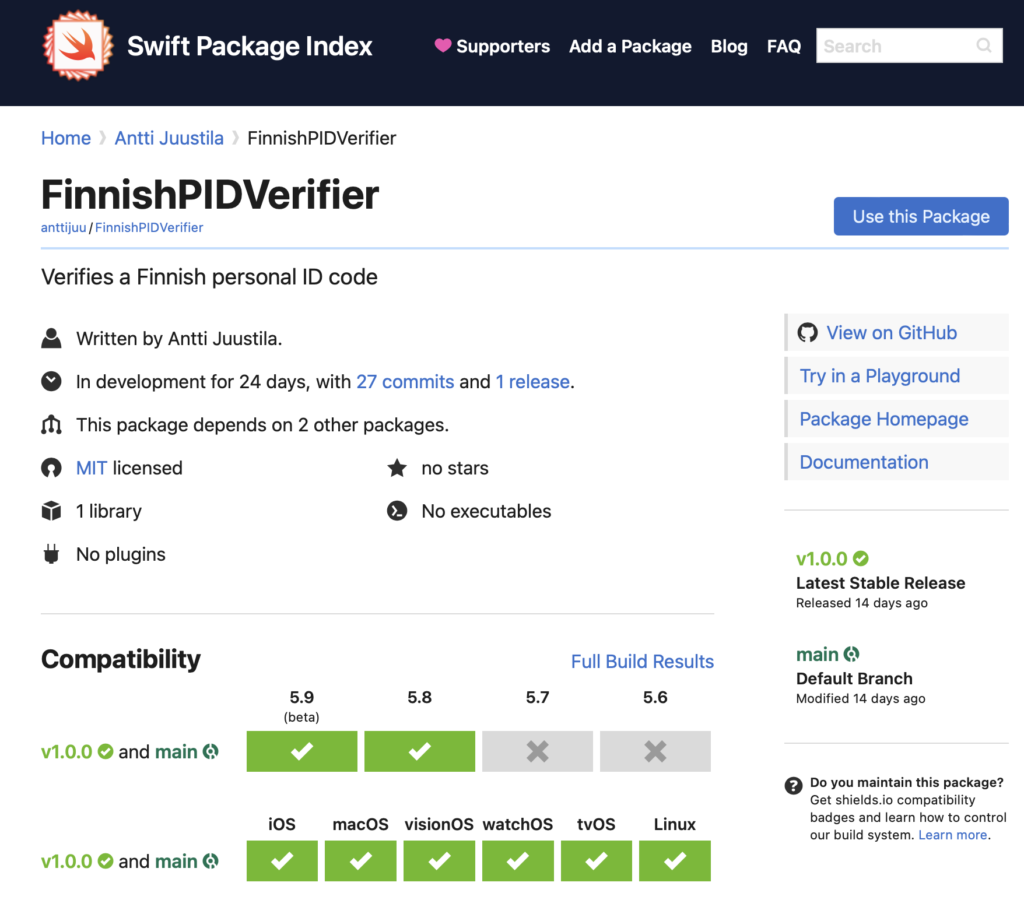
I created a Swift library for verifying Finnish Person Identification (PID) numbers (henkilötunnus in Finnish), FinnishPIDVerifier.
Using these PIDs in apps should be used only if really, really needed. Use some other ways to identify users / customers / members of a club or anyone. An UUID or something.
I’ve used the Finnish PID verification as a small programming task in several courses, mainly to check prerequisites in programming skills when students enter my courses.
Anyhows, I just wanted to try out creating a reusable Swift library as a Swift package. Another thing I wanted to learn is to write documentation using Swift DocC. Third thing I wanted to experiment with this project was to add the library to Swift Package index.
The Swift Package Index is a place to find packages you may find useful and actually import into your own apps. Now you can find the FinnishPIDVerifier in the Swift Package Index too.
…when I learned how to localise strings containing plural values using string dictionaries (.stringsdict) in Xcode.
I am working on a terminology app teachers could use to write basic terminologies about the courses they teach. Then they could share those to the students to aid in learning the course topics. Student can also add new terms to the terminology if they wish on their own devices. And even create their own terms and terminologies. Users can also share the terminologies to others.
Anyways, I wanted to localise this at least to Finnish and English. I was supervising three localisation related student software engineering projects this Spring, so I guess that also motivated me to learn more.
Anyways, I already knew from before how to do simple localisation, but not how to localise singular and plural forms of text using string dictionaries. Finally I decided to take a shot at it, and here is the result, in Finnish first. The localised text is on the left side list, on the second gray text row of each list item:
The list on the left is localised from English to Finnish, using string dictionaries to pluralise the count of elements (gray text on second line of list items). The string dictionary XML is visible in the background in Xcode editor.
Below is the English version. Note that the actual contents of the app has been written in Finnish, so the main text in first line of the list is of course Finnish – only the descriptive text (“Category has 40 terms” or “No terms in this category”) is localised. And pluralised, which was the main goal here.
English localisation of the same view.
This was bit of a fight (as usual), since the documents are there but no single document shows in one place a) how to specify the string dictionary and b) how to use it from code in SwiftUI. I managed to write the XML file using Apple documentation, but couldn’t find a usage sample there.
So I searched the internet and browsed Stack overflow. Then it came to my mind that surely I have some sample app or open source app on my machine where string dictionaries are used. So I searched from the directory under which I have all the source code:
find ./ -name "*.stringsdict" -print
And found that the NetNewsWire RSS reader app (highly recommended!) that I cloned from GitHub some time ago uses it. Then I dug into the source code and saw a sample from there. This and some stack overflow discussions helped me to finish the job.
So here is a sample of the string dictionary (Finnish version):
<?xml version="1.0" encoding="UTF-8"?>
<!DOCTYPE plist PUBLIC "-//Apple//DTD PLIST 1.0//EN" "http://www.apple.com/DTDs/PropertyList-1.0.dtd">
<plist version="1.0">
<dict>
<key>term(s) in category</key>
<dict>
<key>NSStringLocalizedFormatKey</key>
<string>%#@terms@</string>
<key>terms</key>
<dict>
<key>NSStringFormatSpecTypeKey</key>
<string>NSStringPluralRuleType</string>
<key>NSStringFormatValueTypeKey</key>
<string>lld</string>
<key>one</key>
<string>Kategoriassa on yksi termi</string>
<key>other</key>
<string>Kategoriassa on %lld termiä</string>
<key>zero</key>
<string>Ei termejä tässä kategoriassa</string>
</dict>
</dict>
</dict>
</plist>
And this is how to use it from code — the actual beef of the whole thing. All the complexity above is to make the code simple, even though you would add support for tens of different languages to the app.
First the actual Text element in SwiftUI view that shows the localised and pluralised text:
And the function categorySubTitle() that does the formatting:
private func categorySubTitle() -> String {
let format = NSLocalizedString("term(s) in category", comment: "");
return String.localizedStringWithFormat(format, category.termCount)
}
Simple — when you finally get the pieces together.
Hopefully I’ll get the app finished by Fall to be used by students and staff who find if useful. As a bonus, this will be a topic for a new demonstration in a GUI programming course I am participating as an assistant teacher next Spring.
There’s one potential obstacle though — seeing the new SwiftData and other new stuff coming out this week from WWDC2023 are soooo tempting….
But if I start working using those betas, I’d have to redo lots of stuff. Though since I am already using Core Data, that shouldn’t take too long. There is also the issue that then the apps (this works on macOS, iOS and iPadOS, sharing data via iCloud) would require macOS 14 Sonoma and iOS 17, and that might leave out many users who cannot upgrade or haven’t upgraded by the time courses begin… And I’d also pay some time to refactor the Java version too, that also needs some attention.
When going through some course projects, there were some deliverables using a SQL database.
If you are just hacking something to quickly test or demonstrate a thing, you do not necessarily have to do things as they should be done. Course projects are usually not quick hacks, but should demonstrate the things you have been taught and things you have actually learned.
So, for course projects using SQL databases, this means that you should do things so that the database is not exposed to simple SQL injections. Or that you should actually encrypt confidential data, such as passwords saved in database tables.
Why I am being such an asshole, expecting these to be done properly in student course projects?
Because the way you implement things, demonstrates what you have learned. Demonstrating that in course projects is kind of expected.
The things you learn going through the study program courses, should be carried on from course to course, accumulating skills and knowledge.
Because the things you consistently design and implement, is embedded into your deeper knowledge and skills and is then easier to take into use when needed in real life settings.
Because when knowing at least the basics of these things, you perhaps do not expose real apps and systems to these vulnerabilities when you go to work in the industry. Something that happens way too often…
So, if you do use a SQL database in your course work, do the basic things the way they should be done. Use prepared queries instead of exposing the app to SQL injections. Encrypt the confidential data, at least the user passwords.
I made a demo app to show how this is done, and a (Finnish) YouTube video to demonstrate the things in action to anyone learning database programming basics.
Yes, I know this demo app is not perfect either. But the idea is to demonstrate (simply) how to consider these very basic, small things in database programming. Small things that still have a considerable impact on app security.
Next Fall is the fifth time when I teach the course Data Structures and Algorithms. I received the course on 2019 and after a year of familiarising with the course, started developing it.
First I switched from C to Java and implemented automated unit tests to verify the correctness of student implementations. Some unit tests also measured time performance with varying numbers of n. The measurements were then used to support the time complexity analysis of the implementations, in addition to analysing the pseudocode and implemented algorithms. Comparing the implemented fast algorithms and data structures to slower ones was also one of the things students did.
All this to support the students to learn to see the difference between algorithms and helping them to decide which algorithm or data structure to use in whatever situation. Many times a simple algorithm suffices and simple array and plain loops are enough. But sometimes, something more is needed.
In the last two years, one or two exercise tasks had a graphical user interface (GUI) instead of a console UI, most of the tasks have. The feedback from the students was that seeing the actual effect on using faster and better data structures and algorithms in a GUI was a very nice thing to have. It really gave them a tangible view on the benefits of using these algorithms (like partitioning a large array) and data structures (finding a path using Dijkstra’s algorithm in a maze game).
Based on this student feedback, I decided to implement a GUI to all exercise tasks for the Fall 2023 course. The experiment I want to make is to see if having a GUI helps in motivating the students to work on and learn from the course exercises, compared to the more common console UIs and seeing the results of unit tests passing (or not).
Yesterday the first version of the GUI was finished, including all the exercise tasks to teach concepts like:
sorting an array with simple (and slow, with large n) insertion sort algorithm,
sorting to both ascending and descending order using the Java Comparator interface,
searching using linear search algorithm,
after sorting, implementing faster search using binary search,
implementing a Stack to verify a JSON file has no issues with parentheses nor quotation characters,
implementing a Queue to implement a “call list” (either using an array or a linked list as the internal data structure of the Queue),
when dealing with larger data sets, using faster sorting algorithms like quick sort, heap sort or merge sort,
to make handling large data sets faster in adding data elements and searching for them, using a binary search tree as the data structure,
using a hash table to count the number of unique words used in a text file and list the top 100 words with counts (a classical problem in data structures and algorithms), and finally,
using a graph data structure and associated algorithms (like Dijkstra’s) to find a shortest path between two data items.
So in addition to the already existing unit tests and time efficiency measurements, to verify the correctness and time performance of their data structure and algorithm implementations, next Fall they will also see these working in a “real life” application, the TIRA Coders Phonebook app:
TIRA Coders Phonebook app screenshot
Each of the smaller windows and dialogs appear when the feature is used from the menu of the application.
On the lower right corner, there is a log window displaying time performance data when executing the different algorithms; filling the data structures, sorting the data, searching for data, etc.
Students are able to load phonebooks of different sizes, from 100 coders up to 1 000 000 coders, and see how their implementations of different data structures and algorithms cope with various numbers of n.
I still need to work on this app more, making sure that when I remove all the solutions for the data structures and algorithms I’ve implemented, the app is still functional enough to be a starting point for the students to start working on the course exercise tasks.
I also need to carefully point to the students the parts of the code they need to work upon, and parts of the code they do not need to care about, not to get confused by the things not relevant in learning the course topics.
It will be exiting to see, in a couple of months, how this works out and if having the GUI helps in learning or motivates students to work on the tasks.
Currently I am parsing plain text output from git log –numstat command, looking at certain order of lines and line beginnings to determine what is on the line.
Exporting from git log to JSON using jq like Simon does in his post would make parsing extremely simple using Swift Codable.
Last night we turned the time towards summer again.
So if we program all the clocks to go too fast (~20 secs a day) for half of the year and, correspondingly, go too slow (again ~20 secs a day) for the other half of the year, we would not need to do this clock manipulation thing twice a year at all.
Update March 26th: they seem to be up and running again!
I’ve been using weather.willab.fi weather service located here in Oulu, at the VTT research center, for years in many of my courses.
It has been a good demo for teaching many basic computing and networking topics, for example:
how to use curl to execute network requests and look at the different HTTP headers the server provides in the response;
how HTTP works on top of lower level protocols (TCP), using Wireshark for traffic analysis;
localization of simple Android and iOS apps;
what is JSON and XML and how they look like with simple weather data;
what is a server and what is a client on the Internet;
and maybe something else I do not remember now.
But anyways, the service has been down for some time, returning weather data from around December 2022. Now it is even worse; it just displays the nginx server welcome page, and HTTP 404 when you try to get the current weather contents using http://weather.willab.fi/weather.json.
Hopefully they will kick the service up and running soon! Otherwise I need to rewrite many exercises and demo apps to use some other simple service.
I stumbled to a YouTube video bashing those “quote unquote Clean Code” people for creating badly time performing (fast) code. While he was going through Clean Code principles, he showed, one by one, how not using them produced more performant code.
Every thing he did to make code more time performant – I agree, he is right.
Otherwise, he either is deeply ignorant or was deliberately trolling in a very nasty way. That is why I will not share the link to the video. He had even disabled commenting on the video – a sign he is not after genuine discussion on the topic.
Of course there are conflicting requirements in software development. To satisfy some (many) of those requirements, principles of Clean Code are very useful.
For some other requirements, not using Clean Code principles in some areas of the code is a good thing, to achieve those requirements. Like time performance.
Many times you have to compromise and then pay the price for that compromise. This should be obvious also to the people who made that video.