I stumbled to a YouTube video bashing those “quote unquote Clean Code” people for creating badly time performing (fast) code. While he was going through Clean Code principles, he showed, one by one, how not using them produced more performant code.
Every thing he did to make code more time performant – I agree, he is right.
Otherwise, he either is deeply ignorant or was deliberately trolling in a very nasty way. That is why I will not share the link to the video. He had even disabled commenting on the video – a sign he is not after genuine discussion on the topic.
Of course there are conflicting requirements in software development. To satisfy some (many) of those requirements, principles of Clean Code are very useful.
For some other requirements, not using Clean Code principles in some areas of the code is a good thing, to achieve those requirements. Like time performance.
Many times you have to compromise and then pay the price for that compromise. This should be obvious also to the people who made that video.
LinkedIn seems to be on fire about how AI is going to… whatever something bullshit.
Come on. It may be cool. The tools may be able to produce convincing babbling. Even more than that.
I’ve tried it. It could implement a generic binary search algorithm in Java. That is cool.
But it is not intelligence. It creates lots of bulgur. I wrote bulgur because this autocorrect cannot write bullshit. This “AI” is the same.
It. Is. Not. Artificial. Intelligence. It is a tool to create convincing talk. Not necessarily even factual or true. That’s it. Nothing more. It is a language model with machine learning.
There is no facts. There is no argumentation. There is no truth. There is no real dialogue.
What did I do (professionally) during the year 2022? A long post about all stuff done – and mostly in progress. And a prize at the end…
First, l’ll list my active GitHub repositories of 2022. Some of these were created earlier than 2022 but I did work on these during 2022. Then I will list all the major teaching and other work done as part of my post as lecturer at the university.
So to begin with, here are the major and/or new projects I either started or took major leaps forward in 2022:
The largest project for 2022 is GitLogVisualized app (bash shell scripts, git, JUnit tests, Swift, SwiftUI, macOS) . I started to develop it in November when I realised that I need a way to quickly get an impression how all those 275+ students are doing with their projects in the Data structures and algorithms course. This way we can focus on providing help to those students that have a risk of falling behind the schedule.
GitLogVisualized showing student projects (left column list) and the selected project timeline of commits and passing / failing tests. Student ids are redacted in this screenshot using the SwiftUI redacted feature.
Timed shell scripts are executed automatically every Monday night. Scripts do git pull from each student repository from GitLab, execute git log with certain parameters, then JUnit tests are executed, and all the data is saved in two log files per student repository. The app then loads these log files and shows the project state for each student repository.
Colour codes are used to quickly show if student hasn’t done commits in the last 7-14-19 days (blue, yellow, orange, red) so that we can immediately see who should be contacted to find out if we can do anything to help those left behind ahead in the course. Projects can be sorted ascending or descending order by student, number of git commits and days since last commit.
I am planning to release this app as open source when I get it cleaned up. And a demo video is also in my plans, as soon as I get to it.
Another major project is the TVT-Sanasto, a Java app (Java, Swing, JSON, SQLite database) students can use to learn the basic terms and definitions of different categories of computing and computer networks in Finnish/English. The app can also generate a graph (using GraphViz) showing how terms are related to each other.
TVT Sanasto Java app
Actually, the term categories can be anything, since the app downloads the terms from a server JSON file. So basically anyone can write simple terminologies with explanations in a JSON file, and that can be included in the terminology category index file. Currently these JSON files are hosted in GitLab. I am hoping that other teachers would contribute by writing additional term descriptions and perhaps even create new term category dictionaries for their own courses. See a YouTube video of the app.
I also have a Swift/SwiftUI version for the TVT Sanasto app that works in iOS, iPadOS and macOS (Swift, SwiftUI, SQLite database, localized for Finnish and English), but that is still a private beta. Hopefully I will finish this by next Fall when my courses begin. If I am still teaching them. Oh and one student actually implemented a web app using these JSON dictionaries. Nice that the app family expands this way and enables students use whichever tech they find suitable for their needs in learning the basic terminology of the field.
TVT Sanasto app running on an iPadOS emulator.
Guesswork demo app (Xcode, Swift, SwiftUI, iOS) I implemented for GUI design/programming course in Spring 2022. Idea here was to demonstrate how to consider different screen sizes, zoom levels and screen orientations (portrait/landscape) as part of designing accessibility features in a (mobile) GUI.
Guesswork demo app GUI
MiniGolf scorecard app (Xcode, Swift, iOS) – originally a demo about localisation and internationalisation for GUI design/programming course. I demonstrated how to consider accessibility and enable localisation for two languages and also take into account different calendars (Gregorian, Chinese, …), zoom levels, etc. in GUI design in SwiftUI/Xcode development environment. After the course, I decided to make this a side project but hey, we all know what sometimes happens to side projects…
MiniGolf side project, another one missing me while I am working for money at the day job.
QuestionGenerator (Swift), a command line tool to generate Moodle quizzes. This is for Devices and data networks course. The course is passed by an online Moodle exam, where I ask, among other things, conversions between different radices (numbering systems; binary, decimal, octal, hexadecimal) and simple calculations where values are from different numbering systems. This tool is really convenient in generating tens or even hundreds of random conversions and calculations for students to ponder. The tool exports them into an XML file Moodle can import as quiz questions. Saves time and work when teacher does not need to create these by hand and verify the correct result.
My Slippery Cities Apple Watch app – another side project, but this time already available in the App Store! – is going to get a new feature. I would have liked to release it during Fall 2022, but again too much day job work have pushed this forward, like many other side projects. The new feature is predicting slippery weather for pedestrians based on local weather conditions and forecast provided by Apple Weather service. I am beta testing it and hopefully releasing it this Winter.
Slippery Cities beta showing next five hours slippery warning data based on temperature and precipitation.
The last new app I started in July 2022 I actually never planned to initiate. It just happened. Minesweeper (Swift/SwiftUI, macOS) is another private side project that sporadically advances – or then not when I am too busy doing something I actually get paid for.
Minesweeper in action
The classic game, with three different mine field sizes and a top-10 list of results. Some nice SwiftUI animations and sounds (“composed” with GarageBand) when you step on a mine or happen to win.
Probably the reason I started this game project was to have a realistic real world example of using recursion for the students. When the user clicks on a tile, a recursive algorithm is used to open up all the tiles having no neighboring mines for the user. If you have played the game, you’ll know what I mean.
I am planning to move from SwiftUI animations to SpriteKit graphics. I’ve done some learning on the topic but haven’t yet actually started doing it. As a side project, this may happen later rather than sooner…. Unless I decide to continue with SwiftUI animations and then publish this one in the Mac App Store sooner.
OK, then next to the projects started earlier and/or having only minor updates during 2022:
Updated a Java console chat client (Java, JUnit, HTTP, JSON) used in the 2021 Programming 3 course (server side programming). Chat client was used as a test client so that students could test their servers. Client also has JUnit tests, sending requests to their servers as students test their HTTP server implementations.
Published a GUI chat client (Swift, SwiftUI, HTTP, JSON) for the same Programming 3 chat server. Wanted to try out implementing a GUI chat client using the (then) new Swift async / await features. I implemented this already in 2021 and wanted to release it, perhaps it will help students to try out and learn something else than the usual languages (Java…) used in GUI programming courses.
Warnings app (private; iOS/macOS with Swift, SwiftUI and Core Data with Apple Cloud support). Ongoing side project that fetches various warnings (weather, slippery conditions, air quality, etc) from several open data sources and displays alerts to user, warning about potentially harmful or dangerous environmental conditions. Haven’t touched this for a while due to being too busy with paid work. Surprise, surprise.
books-cpp demonstration about using C++ map data structures std::map and std::unordered_map in a single and multithreaded app. The demo relates to the Data structures and algorithms course. Learning goal here is to be aware of which container library data structure to select for performance, and that sometimes parallel processing may help but not always, at least significantly.
Books and Words (Swift; Xcode, iOS/macOS) – when I knew I would take over the Data structures and algorithms course a couple of years ago, I wanted to brush up my skills in the area and implemented this classic programming exercise. I bought the book Exercises in Programming Style by Cristina Videira and implemented some styles from there in Swift. This year I updated the project with new Swift releases, implemented enum style binary search tree data structure, took new performance measurements, etc.
Graphs is a demonstration app I have used in teaching graph data structures. I made just some tiny updates to it this fall.
Another demo for the Data structures and algorithms course, SortSpectacle (Swift, SwiftUI, iOS/macOS), now has a new sorting method, Block sort. It is a variant of merge sort.
Then to teaching work at the University. What I did in teaching at Spring/Summer 2022:
Taught exercises in Java programming basics in Programming 2 course (around 250 students) for Finnish and English students (separate groups).
Taught GUI design/programming (various programming languages) in Programming 4 course.
Participated in the national collaboration group of lecturers responsible for data structures and algorithms courses in various universities and tech institutes in Finland. We discuss the pedagogical, technical, etc. topics related to teaching, learning and organizing this kind of courses.
Interviewed prospective students over Zoom, applying to our MSc program on software engineering from various countries around the world.
Arranged summer courses for Devices and Data networks and Data Structures and algorithms. These were offered as independent study, without actual teaching.
Prepared improved materials for two of the courses I an responsible for; Devices and Data networks and Data Structures and algorithms. I made improvements to lectures and exercises based on last year feedback from students and colleagues.
And in Fall 2022:
Offered my course Devices and Data networks both in Finnish (252 students) and in English (23 students) separately with three other teachers assisting. Two of them were students I interviewed and selected as part time teaching assistants together with a really nice and professional colleague of mine. Very nice workmates, all of them!
Offered another of my courses, Data Structures and algorithms (313 students). As you can see from the projects above, quite a many of those are for this course.
Supported a colleague teaching the data structures course for international students. Didn’t participate in teaching the English group though.
Preparing (in December) to return – after a very long break – to participate in the study program BSc student projects as a supervisor. Projects launch in the beginning of January. Students plan and execute a software development project for local companies. Teachers supervise them and see that all goes OK, intervene if necessary. I was surprised to see they still use the project documentation templates I created a long time ago in 1998! They’ve been updated since then, obviously.
Last but not least – our study program student guild Blanko awarded me as the Distinguished teacher of the year! This was the second year in a row for me to get this honor! Really taken and humbled that the work I am doing is valued by the students. In addition to the nice award certificate I got a box of various delicacies like chocolate to enjoy. Thanks Blanko!
I am not giving any new year resolutions, but one goal I have is to finish all those side projects this year and put them to actual use somewhere, if anyone is interested or finds these projects of mine fun or useful. Until that happens, I should really, really not start any new side projects…. We’ll see how that goes.
When teaching data structures and algorithms in Java, I have implemented corresponding demonstrations in C++. So not to give too much solutions to the students, if I would be using Java in demos.
When demonstrating a hash table, students are given this Java skeleton of a hash table class to implement, with key-value pairs:
public class KeyValueHashTable<K extends Comparable<K>, V> implements Dictionary<K, V> {
So, how to do something similar in C++ to keep the demo closer to the Java code? For hash table, the Key class (K) must implement the Comparable interface, as well as override the hashCode() and equals() inherited from Object class.
I do not need to implement a Comparable interface in C++, since the operator overloading does what is necessary. But the Java Object.hashCode() is something I’d need to implement differently in C++, since in C++ there is no common base class to override the hashCode() from.
Instead, I need a Hashable interface in C++ and all classes that would be used as the Key in the hash table, would have to implement the Hashable interface:
class Hashable {
public:
   virtual long hashCode() const = 0;
   virtual ~Hashable() { }
};
For example, a Vehicle class can implement Hashable interface and thus can act as a Key in hash table:
class Vehicle : public Hashable {
// ...simple hash function, regNum being a std::string.
   long hashCode() const override {
      long hash = 5381;
      for (auto c : regNum) {
         hash = (hash << 5) + hash + c;
      }
      return hash;
   }
Luckily my C++ compiler supports C++20 with concepts. Now I can say in the HashTable class that the classes to be used as Keys in the hash table must conform to the Hashable interface by providing a CheckType that does the checking:
And then finally in the HashTable, explicitly say that the Key is required to pass this check that it inherits (implements) Hashable:
template <class K, class V>
requires CheckType<K, Hashable>
class HashTable {
Now, if I would try to use Vehiclewithout it being a Hashable:
class Vehicle { // Not implementing the Hashable interface!
...
HashTable<Vehicle, Location> hashTable(20);

// Will result in compiler error:
Constraints not satisfied for class template 'HashTable' [with K = Vehicle, V = Location]
Last year I had 299 students working on their individual git projects in Data structures and algorithms course. It is a challenge to keep up with the status of each student to guide them ahead in the course!
Thinking about this today, I decided to see if I could create some tooling to help me out in keeping in touch on how students proceed in their course projects.
First tool is a bash script to clone or update the projects from GitLab to my local computer. These scripts were written already 2-3 years ago.
Second (new) script goes through the student repositories on my local computer and creates a git log file for each project, with some specific settings:
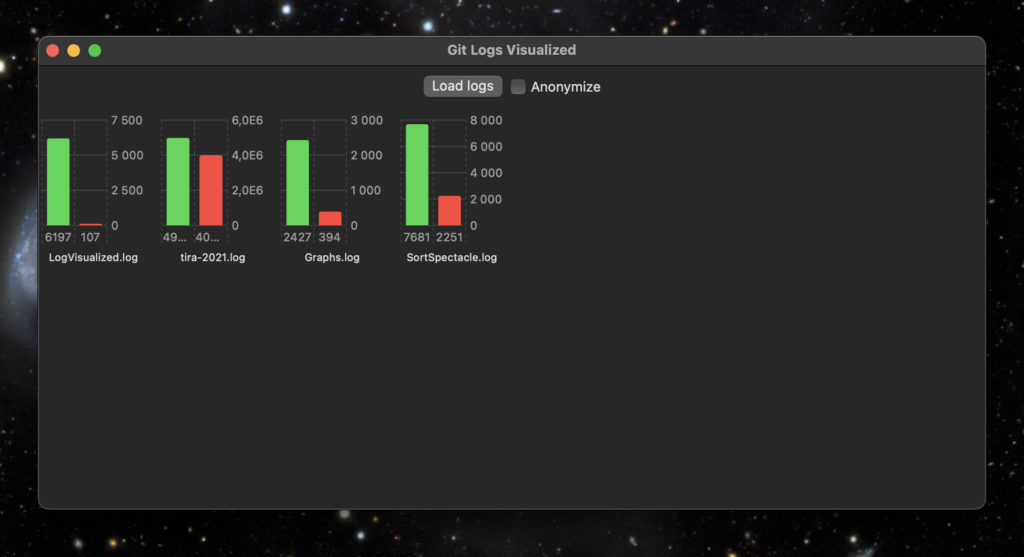
Then I have this Swift/SwiftUI app using the new Swift Charts API to generate a status view for all the student projects from the log files. When I press the Load logs button, all project log files are parsed and simple statistics for each repository is then created from the log files.
My tool app and visualisation of some of my own projects
The green bar shows the number of added lines of code so far, the red one shows the number of removed lines of code.
Anonymize -button puts random strings in place of the repository names, in case I need to show the statistics to others that are not supposed to see the student id’s.
Tomorrow starts this Fall implementation of Data Structures and Algorithms. Let’s see if this tool is of any use to us teachers…
When this basic functionality works, I could also add a line chart showing a timeline of individual projects, how lines of code were added when the course proceeds.
Did some updates to Apps page and About/Tietoja pages. Most importantly, added a link to a demo video of the TVT Sanasto app.
Otherwise being very busy with teaching. Data structures and algorithms course starts after a week and a half. Still need to update some of the exercises, record lecture videos and upload those to YouTube and prepare the learning environment with new material. While teaching ongoing courses… No Fall break for me next week ?
As you, my dear reader, may have already noticed from my previous posts, I am currently teaching a course on how computers work for first year students. Very high level, simplified stuff since there’s only ten hours of lectures and ten hours of exercises for this.
One course exercise is about logic gates. After the lectures on the topic, students use the Digital Logic Sim tool to design some simple logic gates. Starting from AND and NOT gates, they build a NAND (the universal) gate and then OR, NOR and XOR gates using these gates in the project of theirs.
Building an OR gate using three NAND gates.
After this, students design two gates handling a byte (eight bits). Logic gate (or chip) ISZERO, checking if a byte has a zero eight bit integer value. ISEVEN gate checks if a byte is an even number.
Finally, they combine these two gates to check if the value in the byte is an even number and greater than zero. In the end they will meet the question whether the byte is actually signed or unsigned. Since then they need to take into account if the most significant bit (msb) is zero or one. In a signed byte, the msb value of 1 means the value of the byte is actually a negative integer.
Anyhows, in one of the lectures I mention that:
Anything that can be implement in hardware, can also be implement in software. And anything that is implementable in software, can also be implemented in hardware.
So a thought popped in my head out of nowhere: “Should I implement a demonstration in C that actually does implement these gates in software, starting from the boolean operators && and !, not using the ones already in the language?”
Of course I had to do that. Useless and fun. Suits me just fine.
Logic gates AND and NOT are quite simple to implement using boolean operators of C:
The rest you can find following the link above, including a demo app in gates.c and an output file from the app.
What I would like to change in the implementation is to have two implementations of the ISZERO gate, since signed and unsigned bytes should implement this gate differently.
But enough of these uselessnesses. For today, at least.
My ongoing 1st year introductory course on computers has Moodle exams containing different kinds of automatically graded questions like:
An arithmetic task containing radix conversions.
We need to use automatically graded exams since there is 250-300 students each year, too few teachers participating, so evaluating the exams manually would take forever and would be very boring task to do.
Perhaps a necessary disclaimer: Everyone knows these conversions and arithmetics are, in practice, done oftentimes using software tools (programmer’s calculators) or web sites, when you need to. The actual learning goal here is not to say to students that doing this manually is something you have to learn to do for this profession. The learning goal is to expose the way data and simple arithmetics is handled in a computer and play around with these things to get an understanding of how computers work. And in time, you learn to see, for example, when debugging, some things that might be important in the hex, octal or binary values in memory.
Having a large set of questions for a course topic is a good thing to have. Then each exam generated for a student has different set of questions, randomly chosen by Moodle.
This poses another boring task problem. I would have to write tens or hundreds of these questions, choosing the values to convert or calculate, converting them to different radices, calculate the result and then use Moodle question editor to write the questions. And translate them to Finnish (or from Finnish to English), since I teach the course in two languages.
Well, what do you need when you have simple, boring repetitive tasks to do…?
A computer.
Well, a computer alone is just a bunch of metal, sand and plastics, so in addition, software would be needed.
Since I enjoy programming much more than writing Moodle exam questions, I implemented a command line tool using Swift. This tool generates random number conversion tasks (decimal to hex to binary) and arithmetic tasks (summing different values in different radices). Then these tasks are saved in a Moodle XML exam question format in a file.
./ConversionQs output-fi.xml 20 fi --verbose
The command above generates 20 conversion and arithmetic tasks each, in Finnish, outputs them to output-fi.xml file and shows me the progress in terminal window (--verbose flag). Below is an excerpt from an English output file:
<?xml version="1.0" encoding="UTF-8"?>
<quiz>
<question type="shortanswer">
<name>
<text>Convert between radixes</text>
</name>
<questiontext format="html">
<text><p>Convert the value 66 to radix: hexadecimal.</p> <p>Consider the values to be signed bytes, with eight bits.</p>
<p>Write in the answer the prefix for the radix (0x, 0b) asked, if it is not decimal.</p>
<p>Otherwise, use only the digits of the requested numbering system, no spaces or other punctuations.</p></text>
</questiontext>
<defaultgrade>2.0000000</defaultgrade>
<penalty>0.3333333</penalty>
<answer fraction="100" format="moodle_auto_format">
<text>0x42</text>
</answer>
</question>
...
Then I just import the XML file to Moodle, placing the questions into appropriate question category. Choosing a number of random questions from this set to an exam is an easy thing to do. Whenever I need a fresh set of questions, I just run the command again.
What a rise in productivity level of a teacher! Implementing this took around one working day. Now generating tens or even hundreds of exam questions happens in a fraction of a second, instead of hours and hours of mind consuming boredom!
Swift code exporting the generated questions to an XML file.