Multiple Git repository status awareness app

A year ago I started to implement a GUI app that I could use to track the 250-300+ student projects of my Data structures and algorithms course. The motivation for the tool was to answer the question:

How can you manage four courses with nearly 1000 students when you only have two full time teachers and two part-time supportive teachers to manage all teaching, evaluating and supporting the students in their learning in all of these courses?

Me

The plan was, that using this tool, I could more easily be aware of the statuses of the many student projects in this one course. And then when necessary, do something about possible issues.

Like, knowing that a student is left behind (no commits to the project in the last week or two), gives me a possibility to ask if there is anything I as a teacher could do to help the student to proceed in the course.

And if one or several of the unit tests of the various course programming tasks fail, especially if the task was supposed to be finished already, I could go and check the reason(s). Either by asking the student or taking a look at the git repository of the student myself.

The version last year required me to run shell scripts that would automatically retrieve the up to date code of the student from their remote repository using git pull. Output was directed to a log file the app then parsed to view the content. Similarly, tests were executed in batch from shell scripts with Maven (mvn test), result written to another log file. Again, the app would parse that log file to show in a graph how the tests succeeded or failed.

A while ago I decided that I would like to integrate all the functionality within the GUI app and ditch the separate shell scripts. Also, I decided that the information about the commits and test results would be saved into a database. This way, when app launch is now much faster since it does not need to parse the various log files to show content every time the app is launched.

Instead, when launched, the app reads the repository information, git log data and the test results from a database file. App launches much faster with immediately visible data. When I want to update the commit data for all student repositories, I just press the refresh button in the app toolbar and the app starts to pull data for each repository from the remote repository URLs.

Anonymised student repositories with commit and test data.

When I want to update the test data, pressing another button (the hammer button in the toolbar) starts to execute tests that are due, saving the test results in the app database. I can also refresh an individual repo from remote or execute tests for a single project to get a quick update on the status of the student’s project.

Until now I’ve focused on getting the tabular data visible. Yesterday, I implemented a similar commit grid view you can see in a person’s GitHub profile. This color grid shows the commits visualised for all student repositories:

Commit grid visualisation,

In this grid, time proceeds vertically from up towards bottom of the grid view. Each repository is one thin column on the grid. The timeline starts from the date the course started, proceeding down.

The grid ends at the current date in the bottom of the grid. So when the course proceeds the grid gets taller. Since this course displayed here started on September, the grid here is 42 days “tall”. This will give me a very high level visual awareness of level of activity among all the students in the course.

Obviously the usefulness of the tool depends on the fact (?) that students push their commits to the remote repository often, preferably daily or at least weekly. If they do not, we teachers cannot see them and this tool does not show them. As you can see, some of the repositories are in red, meaning there has not been a commit for over 14 days. Orange repositories indicate the most recent commit being over a week old.

Red and orange colors may mean that the student has decided to do most of the course progrmming just before the deadline. A common though not the best choice. So seeing lots of red at this point does not necessarily mean big issues with passing the course. We’ll see…

I’ve been constantly trying to motivate the students to do commits and pushing often. It is beneficial for them too – you get a backup of your work in the remote, and when you need teachers’ assistance, teachers have immediate access to the code from the remote.

Since the first real deadline of the course will be after two weeks, it is time for me to start using the information from the tool:

  • I can easily send email to the student not having recent commits, by clicking on the (redacted) blue text where student name is displayed – that will initiate an email I will send to the student.
  • Clicking on the repository URL (also redacted) will open the browser and take me to the remote repository web page of that student.
  • Another (redacted) blue line will open the local folder in Finder for me to start looking at the student project directory on my machine.

Those repositories in blue are all OK, and (probably) I do not need to be concerned with those. Especially if the scheduled tests also pass. The purpose of the tool is to let me focus on those students that probably need attention to be able to pass the course in time.

Some implementation details:

  • Implemented on macOS using Xcode, Swift and SwiftUI.
  • Uses Core Data as the app database, with five database tables and ten relationships between the tables.
  • Executes git and mvn test commands in child processes using Process class.
  • SwiftUI Table used for tabular content.
  • Commit grid is draw in a SwiftUI view using Canvas and GraphicsContext.
  • Uses the SwiftUI redacted(reason:) function to hide student information for demonstration purposes.
  • Student and repository data is imported from a tab separated text file exported from Moodle. There, student enter their information and the remote repository URL in a questionnaire form. The form data is then exported as a tsv file, which is imported to the app and all student data is written to the database. No need to enter the student data manually.

Decoding and encoding class hierarchies in Swift

A while ago I was implementing (for fun) a chat client to work with a chat server used in teaching in a GUI programming course. The client is implemented with Swift and SwiftUI.

In the GUI programming course, students get the server and a sample console client, both implemented in Java. The goal for the students is to both design and implement a GUI chat application. Learning goals are related to GUI design, usability design and implementation of a GUI in a selected language and GUI framework. The server is accessed over TCP and data format is JSON.

One tricky thing was to figure out how the Swift Codable could handle a class structure with a base class Message, having different types of messages as subclasses. For example, ChatMessage (having the sender, message, timestamp, etc.), a ListChannelsMessage (containing the available channels on the server side to join), et cetera.

The Java console client class diagram, containing the same message classes as the Swift app.

The Swift Codable does not directly and simply bend to this kind of a class hierarchy. I searched the net and found a good basis here, but it didn’t fully show how to do both decoding and encoding with a class structure like I had.

So obviously, for fun, I banged my head against the wall until I got it working. I was supposed to write a blog post about that, but haven’t had the time.

But today someone in Mastodon asked the exact question; how to do something like this. A good motivation for me to actually do something about that! I didn’t want to publish the whole Swift Chat client app, since students are still able to start working on this project, and someone might want to select Swift/SwiftUI as the GUI for their app.

So instead, I extracted the code to show how to use Codable and JSONSerialization together to handle a class hierarchy like this to encode and decode objects to JSON and back. The code is now available as a simple example project in GitHub.

I shared the repository to the Mastodon discussion. What was exciting for me is that one of the core persons in developing the Swift language itself favourited my reply! ?

Swift library for verifying Finnish PIDs

I created a Swift library for verifying Finnish Person Identification (PID) numbers (henkilötunnus in Finnish), FinnishPIDVerifier.

Using these PIDs in apps should be used only if really, really needed. Use some other ways to identify users / customers / members of a club or anyone. An UUID or something.

I’ve used the Finnish PID verification as a small programming task in several courses, mainly to check prerequisites in programming skills when students enter my courses.

Anyhows, I just wanted to try out creating a reusable Swift library as a Swift package. Another thing I wanted to learn is to write documentation using Swift DocC. Third thing I wanted to experiment with this project was to add the library to Swift Package index.

The Swift Package Index is a place to find packages you may find useful and actually import into your own apps. Now you can find the FinnishPIDVerifier in the Swift Package Index too.

Today I was [too many] years old…

…when I learned how to localise strings containing plural values using string dictionaries (.stringsdict) in Xcode.

I am working on a terminology app teachers could use to write basic terminologies about the courses they teach. Then they could share those to the students to aid in learning the course topics. Student can also add new terms to the terminology if they wish on their own devices. And even create their own terms and terminologies. Users can also share the terminologies to others.

Anyways, I wanted to localise this at least to Finnish and English. I was supervising three localisation related student software engineering projects this Spring, so I guess that also motivated me to learn more.

Anyways, I already knew from before how to do simple localisation, but not how to localise singular and plural forms of text using string dictionaries. Finally I decided to take a shot at it, and here is the result, in Finnish first. The localised text is on the left side list, on the second gray text row of each list item:

Screenshot of a app view with localised text in Finnish, the number of elements pluralised.
The list on the left is localised from English to Finnish, using string dictionaries to pluralise the count of elements (gray text on second line of list items). The string dictionary XML is visible in the background in Xcode editor.

Below is the English version. Note that the actual contents of the app has been written in Finnish, so the main text in first line of the list is of course Finnish – only the descriptive text (“Category has 40 terms” or “No terms in this category”) is localised. And pluralised, which was the main goal here.

Screenshot of a app view with localised text in English, the number of elements pluralised.
English localisation of the same view.

This was bit of a fight (as usual), since the documents are there but no single document shows in one place a) how to specify the string dictionary and b) how to use it from code in SwiftUI. I managed to write the XML file using Apple documentation, but couldn’t find a usage sample there.

So I searched the internet and browsed Stack overflow. Then it came to my mind that surely I have some sample app or open source app on my machine where string dictionaries are used. So I searched from the directory under which I have all the source code:

find ./ -name "*.stringsdict" -print

And found that the NetNewsWire RSS reader app (highly recommended!) that I cloned from GitHub some time ago uses it. Then I dug into the source code and saw a sample from there. This and some stack overflow discussions helped me to finish the job.

So here is a sample of the string dictionary (Finnish version):

<?xml version="1.0" encoding="UTF-8"?>
<!DOCTYPE plist PUBLIC "-//Apple//DTD PLIST 1.0//EN" "http://www.apple.com/DTDs/PropertyList-1.0.dtd">
<plist version="1.0">
   <dict>
      <key>term(s) in category</key>
         <dict>
            <key>NSStringLocalizedFormatKey</key>
            <string>%#@terms@</string>
            <key>terms</key>
            <dict>
               <key>NSStringFormatSpecTypeKey</key>
               <string>NSStringPluralRuleType</string>
               <key>NSStringFormatValueTypeKey</key>
               <string>lld</string>
               <key>one</key>
               <string>Kategoriassa on yksi termi</string>
               <key>other</key>
               <string>Kategoriassa on %lld termiä</string>
               <key>zero</key>
               <string>Ei termejä tässä kategoriassa</string>
            </dict>
        </dict>
    </dict>
</plist>

And this is how to use it from code — the actual beef of the whole thing. All the complexity above is to make the code simple, even though you would add support for tens of different languages to the app.

First the actual Text element in SwiftUI view that shows the localised and pluralised text:

   Text(categorySubTitle())
       .foregroundColor(.secondary)

And the function categorySubTitle() that does the formatting:

private func categorySubTitle() -> String {
   let format = NSLocalizedString("term(s) in category", comment: "");
   return String.localizedStringWithFormat(format, category.termCount)
}

Simple — when you finally get the pieces together.

Hopefully I’ll get the app finished by Fall to be used by students and staff who find if useful. As a bonus, this will be a topic for a new demonstration in a GUI programming course I am participating as an assistant teacher next Spring.

There’s one potential obstacle though — seeing the new SwiftData and other new stuff coming out this week from WWDC2023 are soooo tempting….

But if I start working using those betas, I’d have to redo lots of stuff. Though since I am already using Core Data, that shouldn’t take too long. There is also the issue that then the apps (this works on macOS, iOS and iPadOS, sharing data via iCloud) would require macOS 14 Sonoma and iOS 17, and that might leave out many users who cannot upgrade or haven’t upgraded by the time courses begin… And I’d also pay some time to refactor the Java version too, that also needs some attention.

Oh well. But now some pizza ? and red wine ?!

New GUI for teaching data structures and algorithms

Next Fall is the fifth time when I teach the course Data Structures and Algorithms. I received the course on 2019 and after a year of familiarising with the course, started developing it.

First I switched from C to Java and implemented automated unit tests to verify the correctness of student implementations. Some unit tests also measured time performance with varying numbers of n. The measurements were then used to support the time complexity analysis of the implementations, in addition to analysing the pseudocode and implemented algorithms. Comparing the implemented fast algorithms and data structures to slower ones was also one of the things students did.

All this to support the students to learn to see the difference between algorithms and helping them to decide which algorithm or data structure to use in whatever situation. Many times a simple algorithm suffices and simple array and plain loops are enough. But sometimes, something more is needed.

In the last two years, one or two exercise tasks had a graphical user interface (GUI) instead of a console UI, most of the tasks have. The feedback from the students was that seeing the actual effect on using faster and better data structures and algorithms in a GUI was a very nice thing to have. It really gave them a tangible view on the benefits of using these algorithms (like partitioning a large array) and data structures (finding a path using Dijkstra’s algorithm in a maze game).

Based on this student feedback, I decided to implement a GUI to all exercise tasks for the Fall 2023 course. The experiment I want to make is to see if having a GUI helps in motivating the students to work on and learn from the course exercises, compared to the more common console UIs and seeing the results of unit tests passing (or not).

Yesterday the first version of the GUI was finished, including all the exercise tasks to teach concepts like:

  • sorting an array with simple (and slow, with large n) insertion sort algorithm,
  • sorting to both ascending and descending order using the Java Comparator interface,
  • searching using linear search algorithm,
  • after sorting, implementing faster search using binary search,
  • implementing a Stack to verify a JSON file has no issues with parentheses nor quotation characters,
  • implementing a Queue to implement a “call list” (either using an array or a linked list as the internal data structure of the Queue),
  • when dealing with larger data sets, using faster sorting algorithms like quick sort, heap sort or merge sort,
  • to make handling large data sets faster in adding data elements and searching for them, using a binary search tree as the data structure,
  • using a hash table to count the number of unique words used in a text file and list the top 100 words with counts (a classical problem in data structures and algorithms), and finally,
  • using a graph data structure and associated algorithms (like Dijkstra’s) to find a shortest path between two data items.

So in addition to the already existing unit tests and time efficiency measurements, to verify the correctness and time performance of their data structure and algorithm implementations, next Fall they will also see these working in a “real life” application, the TIRA Coders Phonebook app:

TIRA Coders Phonebook app screenshot. Picture includes text highlighting how all the various algorithms and data structures are included in the app.
TIRA Coders Phonebook app screenshot

Each of the smaller windows and dialogs appear when the feature is used from the menu of the application.

On the lower right corner, there is a log window displaying time performance data when executing the different algorithms; filling the data structures, sorting the data, searching for data, etc.

Students are able to load phonebooks of different sizes, from 100 coders up to 1 000 000 coders, and see how their implementations of different data structures and algorithms cope with various numbers of n.

I still need to work on this app more, making sure that when I remove all the solutions for the data structures and algorithms I’ve implemented, the app is still functional enough to be a starting point for the students to start working on the course exercise tasks.

I also need to carefully point to the students the parts of the code they need to work upon, and parts of the code they do not need to care about, not to get confused by the things not relevant in learning the course topics.

It will be exiting to see, in a couple of months, how this works out and if having the GUI helps in learning or motivates students to work on the tasks.

2022 retrospect

What did I do (professionally) during the year 2022? A long post about all stuff done – and mostly in progress. And a prize at the end…

First, l’ll list my active GitHub repositories of 2022. Some of these were created earlier than 2022 but I did work on these during 2022. Then I will list all the major teaching and other work done as part of my post as lecturer at the university.

So to begin with, here are the major and/or new projects I either started or took major leaps forward in 2022:

The largest project for 2022 is GitLogVisualized app (bash shell scripts, git, JUnit tests, Swift, SwiftUI, macOS) . I started to develop it in November when I realised that I need a way to quickly get an impression how all those 275+ students are doing with their projects in the Data structures and algorithms course. This way we can focus on providing help to those students that have a risk of falling behind the schedule.

Screenshot of the GitLogVisualized app showing repository statistics.
GitLogVisualized showing student projects (left column list) and the selected project timeline of commits and passing / failing tests. Student ids are redacted in this screenshot using the SwiftUI redacted feature.

Timed shell scripts are executed automatically every Monday night. Scripts do git pull from each student repository from GitLab, execute git log with certain parameters, then JUnit tests are executed, and all the data is saved in two log files per student repository. The app then loads these log files and shows the project state for each student repository.

Colour codes are used to quickly show if student hasn’t done commits in the last 7-14-19 days (blue, yellow, orange, red) so that we can immediately see who should be contacted to find out if we can do anything to help those left behind ahead in the course. Projects can be sorted ascending or descending order by student, number of git commits and days since last commit.

I am planning to release this app as open source when I get it cleaned up. And a demo video is also in my plans, as soon as I get to it.

Another major project is the TVT-Sanasto, a Java app (Java, Swing, JSON, SQLite database) students can use to learn the basic terms and definitions of different categories of computing and computer networks in Finnish/English. The app can also generate a graph (using GraphViz) showing how terms are related to each other.

Screenshot of the terminology app helping students learn ICT basic terminology.
TVT Sanasto Java app

Actually, the term categories can be anything, since the app downloads the terms from a server JSON file. So basically anyone can write simple terminologies with explanations in a JSON file, and that can be included in the terminology category index file. Currently these JSON files are hosted in GitLab. I am hoping that other teachers would contribute by writing additional term descriptions and perhaps even create new term category dictionaries for their own courses. See a YouTube video of the app.

I also have a Swift/SwiftUI version for the TVT Sanasto app that works in iOS, iPadOS and macOS (Swift, SwiftUI, SQLite database, localized for Finnish and English), but that is still a private beta. Hopefully I will finish this by next Fall when my courses begin. If I am still teaching them. Oh and one student actually implemented a web app using these JSON dictionaries. Nice that the app family expands this way and enables students use whichever tech they find suitable for their needs in learning the basic terminology of the field.

ICT Terms app running on iPad showing basic terminology like what is Boolean algebra.
TVT Sanasto app running on an iPadOS emulator.

Guesswork demo app (Xcode, Swift, SwiftUI, iOS) I implemented for GUI design/programming course in Spring 2022. Idea here was to demonstrate how to consider different screen sizes, zoom levels and screen orientations (portrait/landscape) as part of designing accessibility features in a (mobile) GUI.

iOS app screenshot of a demo showing a card guessing game.
Guesswork demo app GUI

MiniGolf scorecard app (Xcode, Swift, iOS) – originally a demo about localisation and internationalisation for GUI design/programming course. I demonstrated how to consider accessibility and enable localisation for two languages and also take into account different calendars (Gregorian, Chinese, …), zoom levels, etc. in GUI design in SwiftUI/Xcode development environment. After the course, I decided to make this a side project but hey, we all know what sometimes happens to side projects…

Screenshot of a demo grown into an app. Main screen of minigolf scorecard app.
MiniGolf side project, another one missing me while I am working for money at the day job.

QuestionGenerator (Swift), a command line tool to generate Moodle quizzes. This is for Devices and data networks course. The course is passed by an online Moodle exam, where I ask, among other things, conversions between different radices (numbering systems; binary, decimal, octal, hexadecimal) and simple calculations where values are from different numbering systems. This tool is really convenient in generating tens or even hundreds of random conversions and calculations for students to ponder. The tool exports them into an XML file Moodle can import as quiz questions. Saves time and work when teacher does not need to create these by hand and verify the correct result.

My Slippery Cities Apple Watch app – another side project, but this time already available in the App Store! – is going to get a new feature. I would have liked to release it during Fall 2022, but again too much day job work have pushed this forward, like many other side projects. The new feature is predicting slippery weather for pedestrians based on local weather conditions and forecast provided by Apple Weather service. I am beta testing it and hopefully releasing it this Winter.

Screenshot of the Slippery Cities Apple Watch app showing weather based slippery warnings.
Slippery Cities beta showing next five hours slippery warning data based on temperature and precipitation.

The last new app I started in July 2022 I actually never planned to initiate. It just happened. Minesweeper (Swift/SwiftUI, macOS) is another private side project that sporadically advances – or then not when I am too busy doing something I actually get paid for.

Ongoing minesweeper game screenshot.
Minesweeper in action

The classic game, with three different mine field sizes and a top-10 list of results. Some nice SwiftUI animations and sounds (“composed” with GarageBand) when you step on a mine or happen to win.

Probably the reason I started this game project was to have a realistic real world example of using recursion for the students. When the user clicks on a tile, a recursive algorithm is used to open up all the tiles having no neighboring mines for the user. If you have played the game, you’ll know what I mean.

I am planning to move from SwiftUI animations to SpriteKit graphics. I’ve done some learning on the topic but haven’t yet actually started doing it. As a side project, this may happen later rather than sooner…. Unless I decide to continue with SwiftUI animations and then publish this one in the Mac App Store sooner.

OK, then next to the projects started earlier and/or having only minor updates during 2022:

  • Updated a Java console chat client (Java, JUnit, HTTP, JSON) used in the 2021 Programming 3 course (server side programming). Chat client was used as a test client so that students could test their servers. Client also has JUnit tests, sending requests to their servers as students test their HTTP server implementations.
  • Published a GUI chat client (Swift, SwiftUI, HTTP, JSON) for the same Programming 3 chat server. Wanted to try out implementing a GUI chat client using the (then) new Swift async / await features. I implemented this already in 2021 and wanted to release it, perhaps it will help students to try out and learn something else than the usual languages (Java…) used in GUI programming courses.
  • Warnings app (private; iOS/macOS with Swift, SwiftUI and Core Data with Apple Cloud support). Ongoing side project that fetches various warnings (weather, slippery conditions, air quality, etc) from several open data sources and displays alerts to user, warning about potentially harmful or dangerous environmental conditions. Haven’t touched this for a while due to being too busy with paid work. Surprise, surprise.
  • books-cpp demonstration about using C++ map data structures std::map and std::unordered_map in a single and multithreaded app. The demo relates to the Data structures and algorithms course. Learning goal here is to be aware of which container library data structure to select for performance, and that sometimes parallel processing may help but not always, at least significantly.
  • Books and Words (Swift; Xcode, iOS/macOS) – when I knew I would take over the Data structures and algorithms course a couple of years ago, I wanted to brush up my skills in the area and implemented this classic programming exercise. I bought the book Exercises in Programming Style by Cristina Videira and implemented some styles from there in Swift. This year I updated the project with new Swift releases, implemented enum style binary search tree data structure, took new performance measurements, etc.
  • Graphs is a demonstration app I have used in teaching graph data structures. I made just some tiny updates to it this fall.
  • Another demo for the Data structures and algorithms course, SortSpectacle (Swift, SwiftUI, iOS/macOS), now has a new sorting method, Block sort. It is a variant of merge sort.

Then to teaching work at the University. What I did in teaching at Spring/Summer 2022:

  • Taught exercises in Java programming basics in Programming 2 course (around 250 students) for Finnish and English students (separate groups).
  • Taught GUI design/programming (various programming languages) in Programming 4 course.
  • Participated in the national collaboration group of lecturers responsible for data structures and algorithms courses in various universities and tech institutes in Finland. We discuss the pedagogical, technical, etc. topics related to teaching, learning and organizing this kind of courses.
  • Interviewed prospective students over Zoom, applying to our MSc program on software engineering from various countries around the world.
  • Arranged summer courses for Devices and Data networks and Data Structures and algorithms. These were offered as independent study, without actual teaching.
  • Prepared improved materials for two of the courses I an responsible for; Devices and Data networks and Data Structures and algorithms. I made improvements to lectures and exercises based on last year feedback from students and colleagues.

And in Fall 2022:

  • Offered my course Devices and Data networks both in Finnish (252 students) and in English (23 students) separately with three other teachers assisting. Two of them were students I interviewed and selected as part time teaching assistants together with a really nice and professional colleague of mine. Very nice workmates, all of them!
  • Offered another of my courses, Data Structures and algorithms (313 students). As you can see from the projects above, quite a many of those are for this course.
  • Supported a colleague teaching the data structures course for international students. Didn’t participate in teaching the English group though.
  • Preparing (in December) to return – after a very long break – to participate in the study program BSc student projects as a supervisor. Projects launch in the beginning of January. Students plan and execute a software development project for local companies. Teachers supervise them and see that all goes OK, intervene if necessary. I was surprised to see they still use the project documentation templates I created a long time ago in 1998! They’ve been updated since then, obviously.

Last but not least – our study program student guild Blanko awarded me as the Distinguished teacher of the year! This was the second year in a row for me to get this honor! Really taken and humbled that the work I am doing is valued by the students. In addition to the nice award certificate I got a box of various delicacies like chocolate to enjoy. Thanks Blanko!

I am not giving any new year resolutions, but one goal I have is to finish all those side projects this year and put them to actual use somewhere, if anyone is interested or finds these projects of mine fun or useful. Until that happens, I should really, really not start any new side projects…. We’ll see how that goes.

Simple analytics for several Git projects

Last year I had 299 students working on their individual git projects in Data structures and algorithms course. It is a challenge to keep up with the status of each student to guide them ahead in the course!

Thinking about this today, I decided to see if I could create some tooling to help me out in keeping in touch on how students proceed in their course projects.

First tool is a bash script to clone or update the projects from GitLab to my local computer. These scripts were written already 2-3 years ago.

Second (new) script goes through the student repositories on my local computer and creates a git log file for each project, with some specific settings:

git log --numstat --branches --date=iso8601 --output=<file>

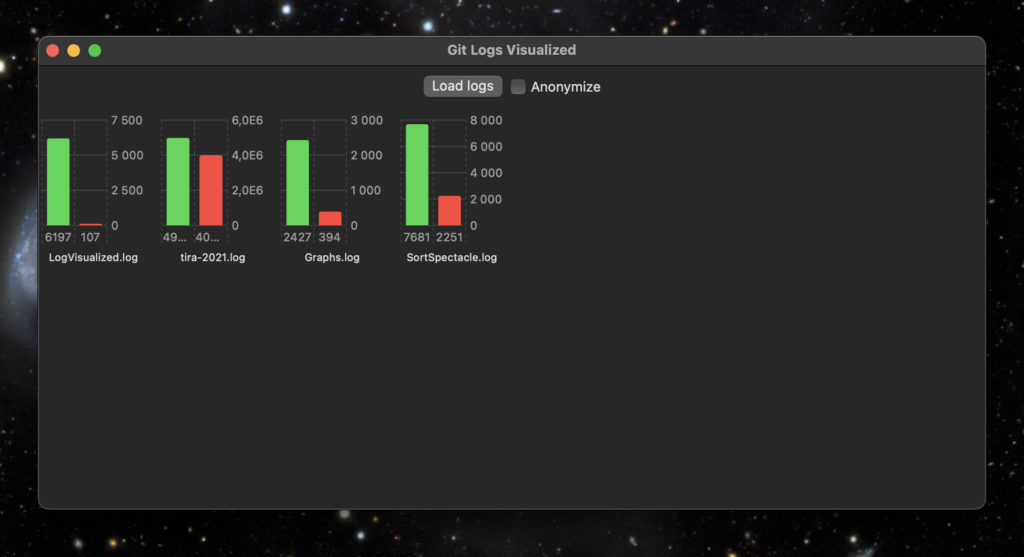
Then I have this Swift/SwiftUI app using the new Swift Charts API to generate a status view for all the student projects from the log files. When I press the Load logs button, all project log files are parsed and simple statistics for each repository is then created from the log files.

My tool app and visualisation of some of my own projects

The green bar shows the number of added lines of code so far, the red one shows the number of removed lines of code.

Anonymize -button puts random strings in place of the repository names, in case I need to show the statistics to others that are not supposed to see the student id’s.

Tomorrow starts this Fall implementation of Data Structures and Algorithms. Let’s see if this tool is of any use to us teachers…

When this basic functionality works, I could also add a line chart showing a timeline of individual projects, how lines of code were added when the course proceeds.

Automation of boring tasks

My ongoing 1st year introductory course on computers has Moodle exams containing different kinds of automatically graded questions like:

An arithmetic task containing radix conversions.

We need to use automatically graded exams since there is 250-300 students each year, too few teachers participating, so evaluating the exams manually would take forever and would be very boring task to do.

Perhaps a necessary disclaimer: Everyone knows these conversions and arithmetics are, in practice, done oftentimes using software tools (programmer’s calculators) or web sites, when you need to. The actual learning goal here is not to say to students that doing this manually is something you have to learn to do for this profession. The learning goal is to expose the way data and simple arithmetics is handled in a computer and play around with these things to get an understanding of how computers work. And in time, you learn to see, for example, when debugging, some things that might be important in the hex, octal or binary values in memory.

Having a large set of questions for a course topic is a good thing to have. Then each exam generated for a student has different set of questions, randomly chosen by Moodle.

This poses another boring task problem. I would have to write tens or hundreds of these questions, choosing the values to convert or calculate, converting them to different radices, calculate the result and then use Moodle question editor to write the questions. And translate them to Finnish (or from Finnish to English), since I teach the course in two languages.

Well, what do you need when you have simple, boring repetitive tasks to do…?

A computer.

Well, a computer alone is just a bunch of metal, sand and plastics, so in addition, software would be needed.

Since I enjoy programming much more than writing Moodle exam questions, I implemented a command line tool using Swift. This tool generates random number conversion tasks (decimal to hex to binary) and arithmetic tasks (summing different values in different radices). Then these tasks are saved in a Moodle XML exam question format in a file.

./ConversionQs output-fi.xml 20 fi --verbose

The command above generates 20 conversion and arithmetic tasks each, in Finnish, outputs them to output-fi.xml file and shows me the progress in terminal window (--verbose flag). Below is an excerpt from an English output file:

<?xml version="1.0" encoding="UTF-8"?>
<quiz>
    <question type="shortanswer">
        <name>
            <text>Convert between radixes</text>
        </name>
        <questiontext format="html">
            <text>&lt;p&gt;Convert the value 66 to radix: hexadecimal.&lt;/p&gt; 	&lt;p&gt;Consider the values to be signed bytes, with eight bits.&lt;/p&gt;
	&lt;p&gt;Write in the answer the prefix for the radix (0x, 0b) asked, if it is not decimal.&lt;/p&gt;
	&lt;p&gt;Otherwise, use only the digits of the requested numbering system, no spaces or other punctuations.&lt;/p&gt;</text>
        </questiontext>
        <defaultgrade>2.0000000</defaultgrade>
        <penalty>0.3333333</penalty>
        <answer fraction="100" format="moodle_auto_format">
            <text>0x42</text>
        </answer>
    </question>
 ...

Then I just import the XML file to Moodle, placing the questions into appropriate question category. Choosing a number of random questions from this set to an exam is an easy thing to do. Whenever I need a fresh set of questions, I just run the command again.

What a rise in productivity level of a teacher! Implementing this took around one working day. Now generating tens or even hundreds of exam questions happens in a fraction of a second, instead of hours and hours of mind consuming boredom!

Swift code exporting the generated questions to an XML file.

Tabs or spaces

I used to be a tabs guy ages ago. Then switched to spaces. I don’t actually remember why and when. Maybe after arguing about this among fellow programming teachers at the university.

The debate around tabs versus spaces, some times quite heated, has been mostly about programming style. But today I saw a tweet that has a relevant argument for using tabs. Programmers using screen readers or braille readers lose valuable space because of spaces (pun intended).

Understandably it takes more space (!) and time to read e.g. nine spaces than three tabs, assuming the tab is configured to match three characters. It is all about accessibility.

So, I will be converting back to using tabs when indenting code.

Work work work

youtube.com/watch

Just checked the first commit date of the completely renovated Data structures and algorithms course repository. It was around December 2020.

Since then I have designed and implemented about ten exercises with unit tests in Java. And two course projects with unit tests. Plus about ten additional demos with Swift. All with commentary and instructions.

In a week the new course begins. I’ve recorded about 20 hours of new lecture materials. Additional videos about graph programming with C++ will be included from last year demos.

One of the reasons for not posting too much lately ?

The video is about one of the course project implementing a graph data structure with various algorithms including Dijkstra’s shortest path finding algorithm. I thought applying this in a game context would perhaps motivate the students to dwell into the world of data structures and algorithms. We’ll see….